

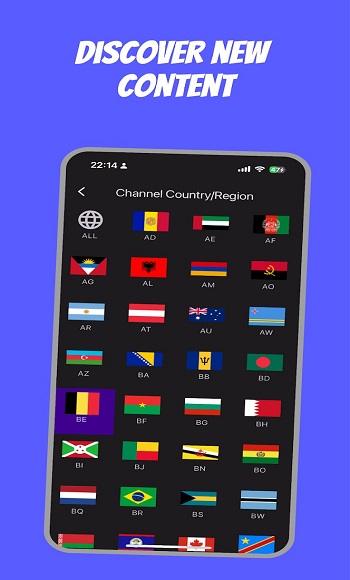
|
Name |
UniTV |
|---|---|
|
Category |
Entertainment |
|
Developer |
Farming INC |
| Last version | 4.5 |
|
Updated |
|
|
Compatible with |
Android 7.0+ |
Table of Contents
1 Information of UniTV2 What Is UniTV APK?3 Main Features of UniTV APK3.1 Live TV Channels and On-Demand Entertainment3.2 Simple Navigation and Built-In Search3.3 HD Video Playback and 4K Support4 How Does UniTV Work?4.1 Browsing and Selecting Content4.2 Favorites and Viewing History4.3 Parental Controls for Shared Devices5 UniTV APK for Android Phones, Tablets, and TVs6 Advantages and Practical Considerations6.1 Who Can Benefit From UniTV?6.2 What to Consider During Everyday Use
What Is UniTV APK?
UniTV APK is an Android entertainment application designed to bring live television, movies, TV series, anime, and other video content together in one place. Instead of switching between different entertainment categories across multiple interfaces, users can browse available programming through a centralized platform with straightforward navigation.
The application focuses on making content easier to find and watch. Its interface organizes entertainment into recognizable categories, while the built-in search function helps users locate particular movies, television programs, and series. Whether you prefer watching live channels or selecting something on demand, UniTV provides different ways to access entertainment.
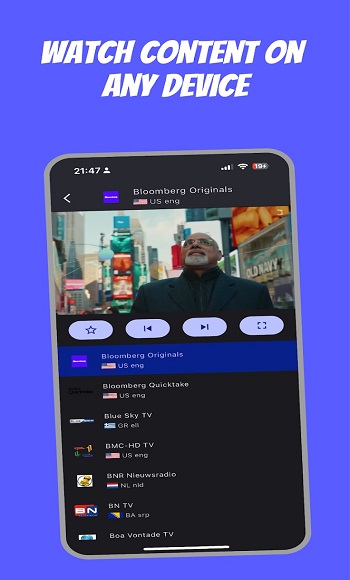
Another practical aspect is its support for different Android devices. Users can access the application on compatible smartphones, tablets, Android TV devices, and TV Boxes. This flexibility makes it suitable for personal viewing as well as watching entertainment on a larger television screen.
UniTV also emphasizes video quality and content variety. Its entertainment offering includes different genres and international productions, while playback support extends to high-definition resolutions. The actual viewing experience depends on the selected content, device capabilities, and internet connection.
Main Features of UniTV APK
Live TV Channels and On-Demand Entertainment
One of UniTV's central features is the combination of live television and on-demand video content. These two viewing options serve different purposes, allowing users to choose between following scheduled broadcasts and selecting individual titles.
Live television is useful when you want to watch programs as they are broadcast. The on-demand sections provide a different experience, allowing users to browse available movies, television series, and other entertainment without following a traditional broadcasting schedule.
The content categories cover several viewing interests, including:
- Movies: Browse available films across different genres, including action, romance, comedy, and drama.
- TV Series: Find episodic entertainment and follow stories across multiple installments.
- Live Television: Access available channels and watch scheduled programming.
- Anime: Browse animated entertainment through dedicated content categories.
- Family Entertainment: Find programming intended for different age groups and viewing preferences.
The selection of titles and channels can change over time. Individual programs may also vary depending on the content currently offered through the service.
Simple Navigation and Built-In Search
Finding something to watch should not require navigating through complicated menus. UniTV uses organized sections and content categories to make browsing more manageable, particularly when users are choosing between several types of entertainment.
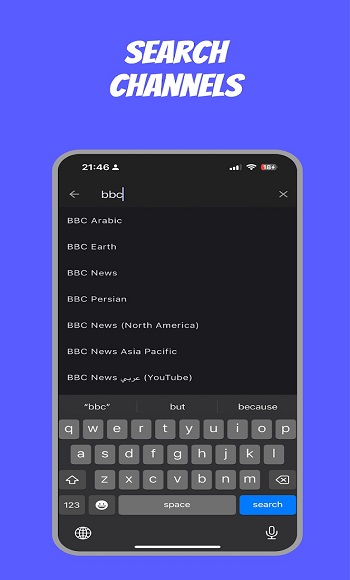
The search function is helpful when you already know the name of a movie, series, or program. Rather than manually scrolling through numerous titles, you can search for specific content and check whether it is available.
Advertisement
Category browsing offers another approach. If you have not decided what to watch, you can explore different genres and highlighted sections until you find something suitable.
This combination supports both direct searching and casual browsing. It also makes the interface approachable for people who are unfamiliar with streaming applications.
HD Video Playback and 4K Support
Video quality plays an important role in entertainment applications, especially when watching movies or television on larger screens. UniTV promotes high-definition playback with support for resolutions up to 4K, depending on the content and playback environment.
Higher resolutions can provide sharper details on compatible displays. However, selecting a high-quality video does not automatically guarantee the same result on every device.
Several factors can influence playback quality:
- The resolution available for the selected movie, channel, or program.
- The speed and stability of the internet connection.
- The display resolution and playback capabilities of the Android device.
- The quality of the original video source.
A stable connection is particularly important for high-resolution streaming. When network conditions fluctuate, video loading and playback consistency can be affected.
How Does UniTV Work?
Browsing and Selecting Content
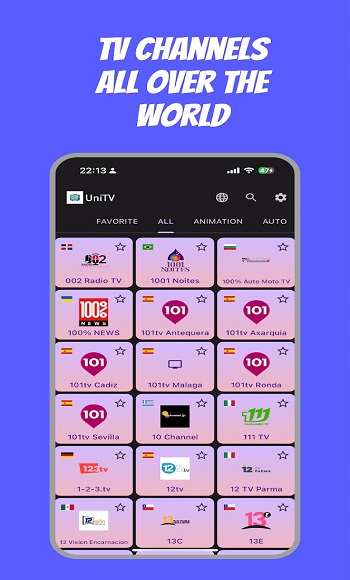
UniTV organizes its entertainment functions around a central browsing interface. Users can move between available categories depending on whether they want to watch live television, a movie, a series, or another type of video.
For example, someone interested in watching a film can open the movie section and browse available titles. A viewer who prefers traditional television can navigate to the live channel area instead.
These different viewing paths make the application practical for households with varied entertainment preferences. Each person can focus on the category that matches their interests without needing to navigate through unrelated content first.
Favorites and Viewing History
Content organization becomes increasingly useful when an application offers numerous titles and channels. Some UniTV implementations include functions related to favorites, viewing history, and continuing previously accessed content.
Favorites help users return to frequently watched channels or selected titles. Viewing history and continuation functions can reduce the need to search for the same program repeatedly.
These conveniences are particularly relevant for television series, where viewers often return to the same show across several sessions. Available options can vary between application editions.
Parental Controls for Shared Devices
UniTV also includes parental control functionality in supported editions, allowing access to certain content areas to be restricted through a PIN.
This can be useful when a television or Android TV Box is shared by adults and children. Rather than relying entirely on separate viewing devices, households can use available access controls to manage particular content categories.
Parental controls complement the application's content organization by providing an additional way to manage entertainment in a shared environment.
Advertisement
UniTV APK for Android Phones, Tablets, and TVs
UniTV is designed around the Android ecosystem, with support for different types of compatible devices. This makes it possible to choose a viewing setup based on screen size, convenience, and how you prefer to navigate entertainment.
On an Android smartphone, the application provides access to entertainment through a portable touchscreen. This arrangement is convenient for personal viewing and checking available programs without sitting in front of a television.
Tablets offer a larger display while retaining touchscreen navigation. They can be suitable for watching longer videos when a television is unavailable.
For living-room entertainment, compatible Android TV devices and TV Boxes provide another option. Their television-oriented interfaces can support navigation through a remote control, making it easier to browse categories from a distance.
Different screens also influence how users interact with the same content. A smartphone is convenient for individual sessions, while a television is generally better suited to group viewing or watching films on a large display.
Internet connectivity remains important for streaming live channels and on-demand video. Although offline viewing is mentioned in some descriptions of UniTV, download availability should not be assumed for every title or application edition.
Advantages and Practical Considerations
Who Can Benefit From UniTV?
UniTV is primarily suited to Android users who want to browse different entertainment formats from a single interface. Its combination of live television, movies, series, and anime can be convenient for people who regularly switch between different viewing interests.
The application may be particularly useful for:
- Movie enthusiasts: Users who prefer browsing films by category or searching for specific titles.
- TV series viewers: People who follow episodic entertainment and frequently return to previously watched programs.
- Live television viewers: Users who want access to scheduled programming alongside on-demand content.
- Android TV households: Families using compatible televisions or TV Boxes for shared entertainment.
- Casual viewers: People who prefer straightforward menus and organized content categories.
What to Consider During Everyday Use
The main convenience of UniTV comes from combining several viewing formats with accessible navigation. Search, content categories, and compatibility with different screens help make the application adaptable to different viewing habits.
There are also practical factors worth considering. The availability of particular titles and channels can change, so the content library may not remain identical over time. Playback quality also depends on network conditions, source resolution, and device capabilities.
For users who mainly watch entertainment online, a stable internet connection and a compatible Android device are important for consistent playback. The overall usefulness of UniTV depends on how closely its available content and viewing functions match individual preferences.
FAQs UniTV
What is UniTV?
+
UniTV is a mobile IPTV app that lets users stream live TV channels globally, supporting m3u and m3u8 playlists on Android TV, phones, and PCs.
How many channels does UniTV offer?
+
The app supports access to over 10,000 live channels through built-in and imported playlists, covering content from all regions and genres.
Is UniTV free to use?
+
Some versions include built-in playlists that work out of the box, while others may require your own playlist or a subscription from a service provider.
Can I use UniTV on my Smart TV?
+
Yes, UniTV works smoothly on Android TVs, Smart TVs, mobile phones, and even PC browsers, making it flexible across all your screens.
What’s the difference between UniTV and UniTV Net?
+
UniTV Net is a version popular in Brazil that combines live TV with films, series, anime, and kid-friendly content in a more complete streaming combo.
Discover More Interesting Apps
-

Vizer TV
vUnknow
16 MB
Updated -
Dzeko11
v5.0
32 MB
Updated -
Geesports 3.8
vUnknow
23 MB
Updated -
Mod
Chai
v0.4.440
149.81 Mb
Updated -
X TV
v2.43.5.1
21.00 Mb
Updated -
Thug TV
v2.0
16 MB
Updated -
Picasso
v10.14.5
27.00 Mb
Updated -
Mod
Amazon Prime Video
v3.0.479.847
189.20 Mb
Updated -
Rave
v9.0.68
113.91 Mb
Updated -
THETV
v4.0.3
17.22 Mb
Updated







Share Your Thoughts